AI Answers (AEO) on WordPress: Step-by-Step Guide
Category
Content
Posted on
Updated

Author
Daria Nikolaeva
SEO & AI Search
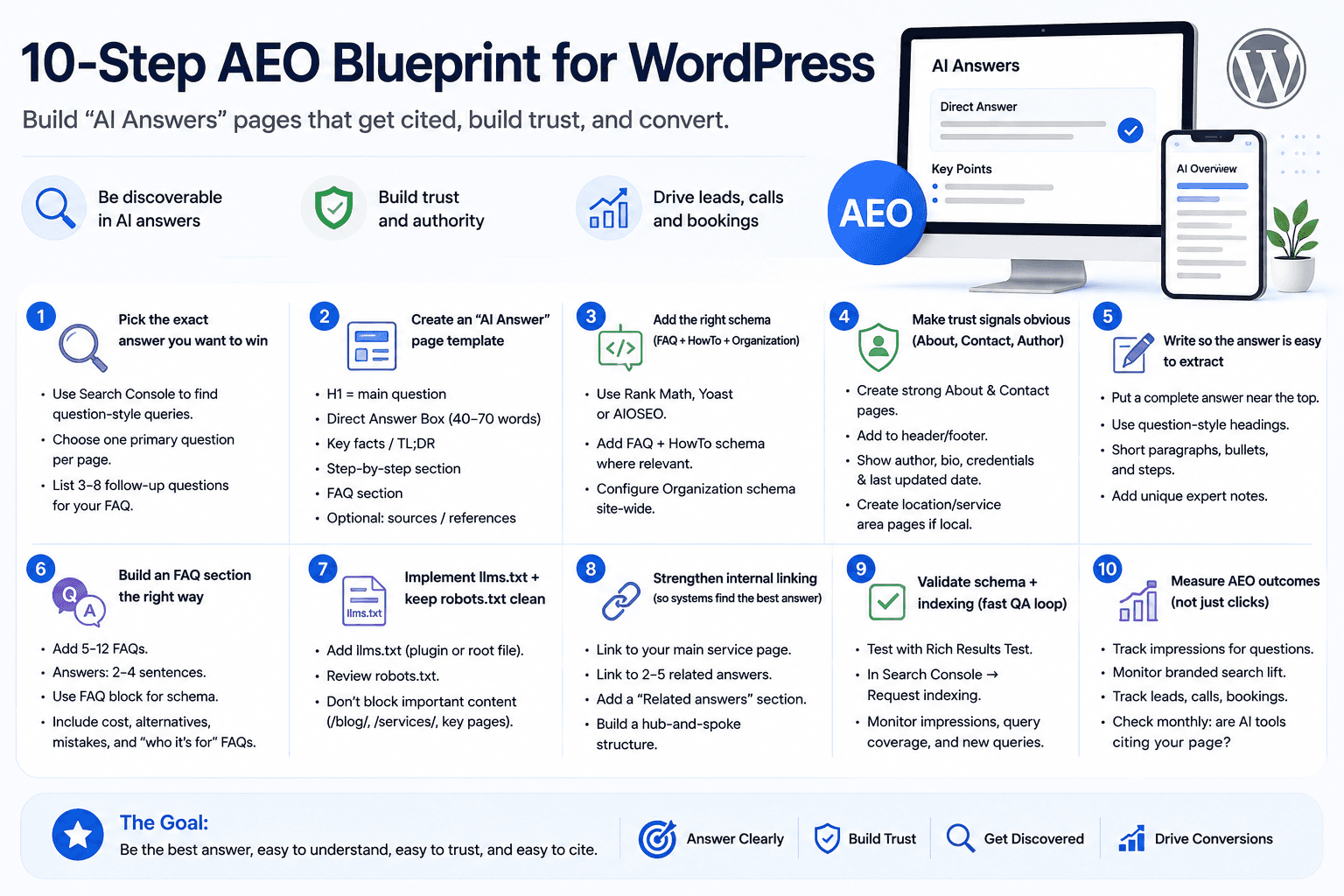
Table of Contents
What you’re building
“AI Answers” pages are designed so search engines and answer engines can quickly identify the best response to a question. AEO (Answer Engine Optimization) focuses on structure, clarity, and trust so your content is eligible to be summarized or cited—without losing the path to conversion (leads, calls, bookings).
If you're new to AEO, AI search optimization fundamentals gives you the broader strategic context before diving into the WordPress setup.
1) Pick the exact answer you want to win
Open Google Search Console → Performance → Queries.
Filter for question-style queries (examples: “what is…”, “how to…”, “best…”, “vs”, “cost”,
“requirements”, “near me”).
Choose one primary question per page (don’t cram 10 questions into one post).
Write down 3–8 common follow-up questions—these become your FAQ section.
2) Create a reusable “AI Answer” page template in WordPress
In the Block Editor, use this structure (save it as a Pattern or reusable template):
H1 = the main question (or a clear keyword title).
Direct Answer Box (40–70 words) immediately under H1 (the most complete short answer you can give).
• Key facts / TL;DR (3–7 bullets).
• Step-by-step section (for how-to queries).
• FAQ section (the follow-up questions).
• Optional: sources / references (a trust booster for complex topics).
Tip: Keep the first screen (above the fold) extremely direct. If a system is extracting, this is the part it will most likely pick up.
3) Add the right schema (FAQ + HowTo + Organization)
Use an SEO plugin that supports structured data and schema blocks (pick one and stay consistent):
• Rank Math (FAQ and HowTo blocks / schema module).
• Yoast (FAQ structured data block).
• AIOSEO (FAQ schema + other schema types).
Typical setup steps:
Install and activate your chosen SEO plugin.
Enable Schema / Structured Data features (module name varies by plugin).
On each AI Answer page: add an FAQ block for FAQs and the HowTo schema when the page is a process/tutorial.
Site-wide: configure Organization schema (business name, logo, address/service area, and social profiles).
Note: Rich results visibility can change over time, but schema still improves machine understanding of your content.
4) Make trust signals obvious (About, Contact, Author)
For the technical side of building a strong foundation, the top 3 technical SEO factors cover site speed, Core Web Vitals, and structured data — all of which directly affect whether ai tools can read your site.
Create or upgrade an About page: who you are, who you serve, proof points, and what makes your approach different.
Create or upgrade a Contact page: real contact methods (email/phone), location or service area, hours, and a clear CTA.
Add About + Contact to your header or footer navigation (site-wide).
For each AI Answer post: show author, a short bio/credentials, and a last updated date.
If you’re local: create city/service-area pages and link them in a consistent internal linking system.
5) Write so the answer is easy to extract (and hard to misquote)
Follow these rules on every page:
• Place a complete definition/answer near the top (40–70 words).
• Use headings that match questions (H2/H3 as questions).
• Prefer short paragraphs, bullets, and step lists over long narrative blocks.
• Skip fluffy intros—get to the point immediately.
• Add 1–2 “expert notes” that are unique (examples, edge cases, a real-world tip).
6) Build an FAQ section the right way
1 Add 5–12 FAQs based on real follow-up questions.
2 Keep each answer to 2–4 sentences—direct and complete.
3 Use your plugin’s FAQ block so schema is generated automatically.
4 Include at least: one cost/pricing FAQ, one alternatives/vs FAQ, one common-mistake FAQ, and
one “who this is for” FAQ.
7) Implement llms.txt + keep robots.txt clean
llms.txt is an emerging convention that helps some AI systems find and understand your key pages.
• WordPress.com: follow their support steps to add llms.txt.
• Self-hosted WordPress.org: use an llms.txt plugin or create /llms.txt at the site root (your hosting
file system).
• Review robots.txt so you don’t block important content (especially /blog/, /services/, and key
landing pages).
Not sure what an llms.txt file actually is or why it matters? This plain-English guide on llms.txt explains it with a real-world example you can copy.
8) Strengthen internal linking so systems find the “best answer”
On every AI Answer page: link to the main service page (your primary conversion page).
Link to 2–5 related answers (build a topic cluster).
Add a “Related answers” section near the bottom.
From the main service page: link back to your top answers (create a hub-and-spoke structure).
9) Validate schema + indexing (fast QA loop)
Test structured data with Google’s Rich Results Test (or a schema validator).
In Search Console: URL Inspection → Request indexing for the new page.
Watch: impressions, query coverage, and the new long-tail queries the page begins ranking for.
10) Measure AEO outcomes (not just clicks)
AI-driven discovery can reduce clicks. Track visibility and influence, not only sessions.
• Search Console impressions for question-style queries.
• Branded search lift (Search Console → branded queries).
• Leads/conversions (forms, calls, bookings).
• Monthly spot checks: are AI tools citing your page or paraphrasing your answer?
Copy/paste mini-template (use in WordPress)
H1: [Question]
Direct answer (40–70 words): [Answer]
Key points:
• …
• …
• …
H2: When to choose this / who it’s for
H2: Step-by-step
1. …
2. …
3. …
H2: FAQs (use FAQ block)
Q: …
A: …
CTA: [Book a call / request quote / contact]
Let’s talk about your next step.
Schedule a free 15-minute consultation with SOURCEsem. Tell us about your business, ask your questions, and get clarity on where to focus next.